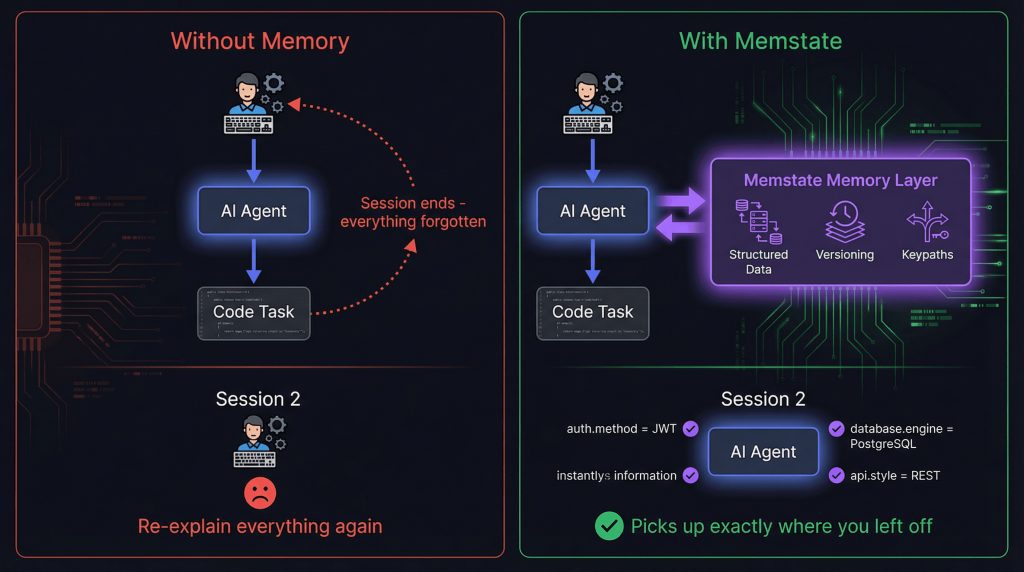
The agent that asked which framework we were on
Last week I asked a coding agent to continue a refactor we had started the day before. On the first day it had opened fourteen files, renamed a service, and fixed the import paths. The next morning it asked me which framework the project used. Then it asked where the tests lived. Then it proposed a folder layout we abandoned back in March.
Nothing on disk had changed. What changed is that the process exited overnight and started again from an empty prompt.
This is the failure people describe as the agent forgetting, and it is almost never fixed by switching to a bigger model. Two different things get blamed for it. The context window is what the model can see during a single run: the system prompt, the tool definitions, the files that got pulled in, the conversation so far. AI agent memory is everything that survives after that run ends. Conflating them is where most debugging goes wrong. If you think the window is the memory, you will keep tuning prompts and wondering why nothing sticks.
The New Stack ran a piece on a startup called Uvi making roughly this argument, that teams are “paying frontier prices for amnesia” (opens in new tab) because every fresh session re-derives the same project knowledge at full token rates. I went looking for the technical detail behind it and landed on a newsletter signup form instead. So the mechanics below come from running agents against my own repos and from provider documentation, not from a study or a vendor benchmark.
What follows is the practical version. Where in the prompt the project knowledge is supposed to live, why the oldest turns are the first to get dropped, which three different bugs all get reported as “the agent forgot”, and how to tell whether a prompt cache is actually saving you money or just moving the cost around. On my own boxes the fix has been a short checked-in file plus a summary step, and I will show you what I put in it.
You do not need a memory platform to get most of the benefit. You need to stop treating the context window as a storage layer.
Background: what is actually happening inside the context window
Every run builds its prompt from the same stack, in roughly the same order. The system prompt comes first, then the tool definitions (which on a busy agent can be thousands of tokens before you have asked it anything), then whatever files the runtime retrieved, then the conversation history, then the tool results. That ordering matters because of how truncation works.
Most frameworks drop from the front when they hit the limit, or they hand the oldest turns to a summarizer. The front of the stack is where you put the project brief, the directory layout, the fact that this repo uses pnpm and not npm. The end of the stack is where the model just printed a 400-line test log. Guess which one survives a long session.
On my own machines I have watched this in the token counter, not in a benchmark. A coding agent starts a task, reads six files to understand the router, and by the time it reaches the actual edit the six file dumps plus tool output have pushed the setup paragraph out of view. The edit is fine. The next edit in the same session is worse, because now the agent is reasoning about imports that are no longer visible to it.
Three different bugs get reported as “the agent forgot,” and they need different fixes:
- Context eviction. The information was in the prompt and got truncated or compressed away. Fix: keep the brief short and put the load-bearing constraints near the end, or re-inject them.
- A fresh session with no persisted state. Nothing was ever written down. The process exited and took everything with it. Fix: a file.
- A summarizer that compressed away the constraint. The history was preserved, but the summary says “a Postgres project” and drops “do not run migrations against prod.” Fix: constraints belong in the static file, never in conversation history.
The cost angle is the same problem seen from the other side. Every mechanism that preserves context is paid for on every turn or every run. Bigger system prompts, more retrieved files, more re-reads: the bill tracks the redundancy, not the work. That is why prompt caching gets brought up in these discussions, and why it only solves part of it.
What’s happening now
The default setup on most developers’ machines is a session that lives exactly as long as the terminal window does. You open the agent, it reads your repo, it does useful work, you close it, and the next morning the working directory is the only thing that carried over. Everything the agent learned about how your project fits together was never stored anywhere, so it gets rebuilt from scratch, at full price, every time.
The workaround most teams have already landed on is a hand-written memory file at the repo root: AGENTS.md, CLAUDE.md, .cursorrules, or whatever name the tool of the week expects. It holds the stack, the build command, the two directories that must not be touched. This works better than people give it credit for, mostly because it is short, static, and version-controlled. The limitation is that it is a snapshot someone maintained by hand, so it goes stale quietly and nobody notices until the agent confidently runs the wrong command.
Prompt caching sits next to this and gets confused for it constantly. What caching does is store the computed prefix of a prompt so the provider does not recompute it on the next request. That cuts latency and cost for repeated calls against the same prefix. What it does not do is remember your project overnight. The TTL is measured in minutes, and a cold cache means you pay full price on the first turn of the day regardless of how good your memory file is. Treat caching as a discount on repetition within a session, not as storage.
The newer layer is external memory stores and MCP servers that write notes to disk or a database between runs and retrieve them at the start of the next one. The pitch is reasonable. The New Stack covered Uvi’s argument that developers are paying frontier prices for amnesia (opens in new tab), and the framing is fair: you are billed for the same re-derivation repeatedly. I have run a couple of these memory servers on small projects and they worked, but I have not pushed them hard enough to say anything useful about retrieval quality once the store gets large.
The bill is where this becomes concrete. A long system prompt, a memory file, six retrieved files, and tool output all get sent on every turn. Caching reshapes the arithmetic on the prefix and leaves the rest alone.
What it means in practice for AI agent memory
Start with the file. An AGENTS.md (or CLAUDE.md, or whatever your tool looks for at the repo root) that states the stack, the build and test commands, the directory layout, and the mistakes the agent has already made is worth more than any clever retrieval setup you can bolt on this month. Keep it short enough that it survives summarization, because a 2,000-line memory file gets compressed by the same mechanism that eats your conversation history. Think of it as the handover note between shifts: the morning crew needs the three things that will break today, not the entire company handbook.
The hygiene rules matter more than the format. Commit the file so it is versioned with the code it describes. Review changes to it in pull requests the same way you review code, because an agent editing its own memory without oversight is how you end up with a note that says the deploy script lives in scripts/deploy.sh three months after you moved it. Prune aggressively. A stale note is worse than a missing one, since the agent will act on it with full confidence while a missing note prompts it to look.
A real memory store earns its complexity when several people or several agents touch the same repo and the file stops being enough, or when the context you need is too large to fit and has to be retrieved selectively. For a small team on one project, a markdown file plus a summarization step at the end of each session covers most of it.
Then do the cost check, because that is what tells you whether any of this worked. In your provider’s usage dashboard, look for the split between cached and uncached input tokens rather than the single total. Anthropic’s API reports cache_read_input_tokens and cache_creation_input_tokens separately in the response, and the billing view reflects that distinction. Compare the cached prefix savings against what re-reading the same six files on every run costs you. If your second run of the day is not cheaper or more correct than the first, the memory file is not doing its job yet.
Does AI agent memory persist between runs?
Short answer: no, not by default. The model holds nothing between calls. Anything that survives was written down by the tooling around it (a file on disk, a row in a database, a cache keyed to a prompt prefix) and read back in at the start of the next run. That distinction is where most “my agent forgot” debugging goes wrong, because people look for a memory feature when the actual problem is that nobody saved anything.
Where does AGENTS.md get loaded from? Claude Code reads CLAUDE.md from the working directory, then walks up through parent directories and your home folder, and Codex and similar tools look for AGENTS.md at the repo root. Read your tool’s docs on precedence, because when a nested file and a root file disagree, whichever loads last wins and you will spend an hour wondering why the agent keeps using the wrong test command.
How long does a prompt cache live? Minutes, not days. Anthropic’s default TTL is five minutes, refreshed each time the prefix is hit, with a longer option you pay more to keep warm, and every provider sets its own numbers. Verify it in the current docs before you design anything around it, since these values have moved more than once.
Why can summarization make things worse? A summarizer is told to compress, so it drops whatever looks incidental. The line it drops is usually the constraint you actually needed, like “never touch the billing module” or “we pin Postgres 14 on purpose.” A short factual file beats a clever summary every time.
Do MCP memory servers change the answer? Only in where the bytes land. They write notes to a local file or a database and load them at session start, which is persistence bolted on by the runtime, not recall living inside the model.
Is caching the same as memory? No. A cache is keyed to an exact prefix, so edit your system prompt by one character and it is a cold start with a full bill.
If it is not in a file or a database, it does not exist next run.
What to expect next
My expectation is that memory stops being a prompt-writing chore and becomes a feature of the agent runtime itself. Right now you hand-curate a markdown file and hope the tool loads it in the right order. Within a year or two I think the runtime owns that job: it decides what to store after a run, decides what to retrieve at the start of the next one, and gives you something to inspect when it gets it wrong. The Uvi team is already pitching that layer, going after what The New Stack’s writeup (opens in new tab) frames as developers paying frontier prices for amnesia, and whether or not they win, the framing is correct. The prompt should not be the storage engine.
The second shift is less comfortable. Once windows get large, size stops being the constraint and retrieval quality becomes the whole game. A million tokens of context stuffed with files the agent did not need performs worse than a tight, hand-picked set, because the relevant line is now buried in noise the model has to weigh on every turn. Anyone who has watched an agent confidently edit the wrong config file after reading the entire repo has seen this already. Bigger windows make lazy retrieval more expensive, not less.
Here is where I am genuinely unsure. All of this holds together fine for one developer with one agent against one repo. I do not know how it survives a team of five people each running two or three agents against the same monorepo, all of them appending to the same memory file. You get merge conflicts in a file that is supposed to be authoritative, and worse, two notes that contradict each other with no timestamp to break the tie. Someone will need to build review and scoping into that file the way we built review into code, and I have not seen a tool that handles it well yet.
If the memory layer does move into the runtime, the interesting question becomes who gets to read and edit it. Treat that as an open problem, not a solved one, and keep your notes in plain text where you can still diff them when the tooling changes underneath you.
Your next step: write the memory file this week
Open your repo and create AGENTS.md at the root, or whatever filename your tool actually reads. Do not guess at the name; check the tool’s documentation, because Claude Code, Codex, Cursor and the rest all look in different places, and a memory file the agent never loads is just another markdown file nobody reads.
Fill in four things. The stack, with version numbers, because “uses Postgres” is less useful than “Postgres 16, migrations via dbmate, never edit schema.sql by hand.” The build and test commands exactly as you type them, including the flags that skip the slow integration suite. A short directory map, three or four lines, pointing at where the API routes live and where the frontend build output lands. Then the part most people skip: the three mistakes the agent has already made. Not vague advice like “be careful with config.” The literal thing that broke. On my own boxes the list started with “do not touch /etc/nginx/sites-enabled directly, edit the file in sites-available and symlink it,” because an agent had helpfully edited the symlink target’s copy and left me with two diverging configs and a 502 I spent twenty minutes on.
Cap the whole file at roughly one screen. If it runs longer, it competes with the retrieved code for space and starts getting evicted at the worst moment, which defeats the purpose. Commit it with everything else, so it moves through review like any other change and you get a diff when someone edits it.
Then measure. Pick a task you have already run, something like “add a health check endpoint,” clear the session so you start cold, and run it twice: once without the memory file present, once with it. Compare what the agent got wrong in each run, and pull the token usage for both from your provider’s dashboard. If the second run was not cheaper or more correct, the file needs sharpening, not more content. Keep the version that wins and delete the lines that did nothing.