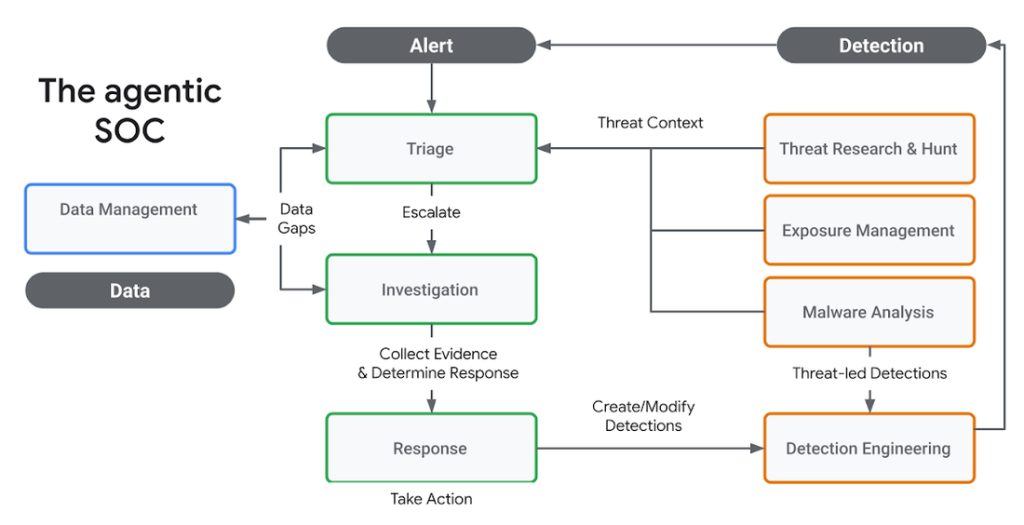
The agentic SOC, and why a one-server shop should care
Cloudflare published a post this week about building an evidence-grounded agentic security operations use on its own platform, and the phrase “agentic security operations” landed in my inbox three separate times before lunch. Two of those emails came from people running exactly one WordPress site each. The third came from a customer of mine with about two thousand mailboxes and no full-time IT staff at all.
That distribution is the interesting part. Cloudflare shipping AI agents is not surprising. People who will never in their lives hire a security analyst asking whether it applies to them is the thing worth reacting to.
My own setup is somewhere in the middle. I run cPanel and WHM boxes for around forty customers, a mix of small business sites, a few WooCommerce stores, and one mail-heavy domain I have come to quietly resent. My current security operations center is me, a phone on the nightstand, and an Uptime Kuma instance that has learned exactly which hours I dislike being woken up. That is not a SOC. It is a monitoring dashboard with a person attached to the end of it, and the person is inconsistent.
I am writing this as a host rather than as a security analyst, because that is the honest vantage point. I do not have a threat intelligence team feeding me indicators. I have logrotate, fail2ban reading /var/log/auth.log, a handful of ModSecurity rules I copied from a forum thread in 2019, and opinions about all of it. When a vendor announces that agents can now triage alerts and propose remediation, my first question is not whether the model is good. It is whether anything on my infrastructure would even show up in its field of view.
One framing note before the substance. Cloudflare’s own announcement post (opens in new tab) sits under a stack of tags (Agents Week, Cloudforce One, AI, Workers, Developers, Security), and tag walls are not specifications. So I am going to describe what the concept claims, separate that from what the public material actually settles, and be explicit about which parts I am guessing at. There is more marketing surface than detail in the current writeup, and I would rather say that now than pretend the gaps are not there.
Background: what a SOC actually is, and why small hosts never had one
A security operations center, stripped of the acronym, is a group of people whose job is to look at alerts and decide what to do about them, plus the tooling that feeds those alerts in and records what happened next. The tooling is the cheap half. SIEM licensing hurts, but the reason a real SOC runs into six figures a year is that somebody has to be on shift when the alert fires, and shift coverage means salaries, handover documents, and a manager above the people doing the handover. Tier 1 triage alone, the person who reads the alert and decides whether it is worth waking an engineer, is a full-time role at any organization large enough to justify one.
I have never had that. Nobody hosting forty sites has that. So the substitute stack got assembled out of whatever was free and installed cleanly: fail2ban watching authentication logs, a set of ModSecurity rules, ConfigServer Firewall doing IP blocks, and a monthly scroll through WHM’s login history when something felt off. That stack is not a joke. It catches a lot, and on a well-configured box it catches most of what a small host will actually see. csf -g and a grep through /var/log/lfd.log have answered more of my questions than any dashboard ever has.
The failure is not detection. Where it breaks is the same place every time. An alert fires at 3am and gets read at 7am, which leaves four hours for whatever already got through. A WordPress brute force against one domain runs for two days and nobody connects it to the outbound traffic that started on the same box the same afternoon, because those two facts live in different files and different tools. And after I do clean up an incident, I almost never write down what I did, so the next one starts from zero. Three separate gaps, all of them about response rather than visibility.
That distinction matters for judging anything sold as an agentic SOC. If my problem were seeing attacks, a better detector would be the answer. My problem is that the same attack gets handled well on a Tuesday afternoon and badly on a Saturday night, and no product fixes inconsistency unless it can act, not just report.
What’s happening now with Cloudflare’s agentic security operations
Cloudflare’s post on building an evidence-grounded agentic security operations use (opens in new tab) describes agents running on Workers AI that take alert context, investigate on their own, and then either propose a response or carry one out. Cloudforce One’s threat intelligence feeds the same loop, so an agent looking at a suspicious IP can pull in whatever Cloudflare already knows about that address, the campaign behind it, or the actor before it decides anything. For a host my size, the appeal is obvious: I have threat data on my own boxes and nothing else.
The word they lean on is grounded. The agents are meant to reason over actual evidence, meaning log lines and telemetry, instead of producing a confident paragraph with nothing behind it. That is the claim I care about most, because I have read enough AI-written incident summaries to know how easily a model can sound certain about a thing it never checked. There is also a use layer sitting around the agents, which handles running them, giving them tools, and keeping the loop from wandering. I read that as the plumbing that turns a model call into something closer to a process.
Where this differs from the SOAR playbooks of the last decade is worth spelling out. A playbook was a flowchart somebody wrote in advance. If condition A, run query B, then block C, and it asked the same three questions every single time whether or not they were the relevant ones. An agent chooses its investigative steps as it goes. A domain starts throwing 401s on wp-login, the agent looks at the source ASN, notices the same range hit two other customers an hour earlier, and follows that thread instead of the one on the page. That runtime choice is the whole pitch.
What the announcement does not settle for me is almost everything operational. There is no price I can plan against. It is not clear how much of this functions when your logs come from somewhere other than Cloudflare’s edge. And whether agents get write access to production by default, or land read-only until you hand them a token, is the question that decides whether I would ever connect it.
What it means in practice for a host my size
The question I keep coming back to is whether any of this replaces fail2ban, ModSecurity, and me squinting at /var/log/secure at half past six in the morning. On its own, no. Cloudflare sees what terminates at its edge. A stolen cPanel password replayed from a residential IP straight to port 2083 over HTTPS never touches that edge at all, because the attacker is talking to my server, not to Cloudflare. The same is true for an IMAP login gone wrong on a mailbox that was never proxied. So the realistic split is this: edge-visible and WAF-visible activity can hand off to agent triage, and host-level activity stays with the tools that already read local logs. If your WHM box sits behind Cloudflare in DNS-only mode for mail and control panel subdomains, which mine does, you have already carved out a large chunk of your attack surface that an edge agent cannot see.
Then there is access. Any vendor pitching this will eventually want a token, and the shape of that token matters more than the feature list. An agent that reads and recommends is a very different animal from one holding an API token with write scope. On my own boxes, and I have had to be strict about this after a 2023 incident where an over-permissioned integration did real damage, anything with write access gets a scoped token, an audit trail, and no path into /home directly. I would want to see the same discipline from Cloudflare before I hand an agent anything beyond read.
Cost is the open question I cannot answer from the public material, which is thin on pricing. For a host doing five figures a year in revenue, a part-time analyst is roughly a known quantity. If agentic operations lands anywhere near that number per month, the math collapses and I stick with what I have.
And if you do not run everything behind Cloudflare, this helps partially. Origin-side telemetry still has to come from somewhere, and without it the agent reasons over a picture with a hole in the middle. The last piece I need before connecting anything is a documented read-only mode I can test against a real box first.
What to expect next
Cloudflare tends to publish in bursts during a themed week, and this one carried the Agents Week tag alongside Cloudforce One, Workers, and AI. So I expect follow-ups on agent permissions, audit logging, and how evidence gets attached to a decision. That last item is the one I care about most, because “evidence-grounded” is the claim in the primary post (opens in new tab) and grounding is exactly what is hard to verify from the outside. Tracing an agent’s conclusion back to a raw log line is an interface problem, and I want to see the interface, not a description of it.
My expectation, stated plainly as an expectation and not as anything I have been told: the first version that is genuinely useful to a host my size will summarize alerts and draft remediation steps for a human to approve. I do not think autonomous blocking on a customer’s production box arrives first, because the liability question has to be settled before the technical question becomes interesting. Nobody wants to explain to a client why an agent decided to null-route their mail subdomain at 4am. The tooling may well be capable of that earlier than the contracts allow it.
Three things I will be watching for specifically. A documented read-only mode, actually shipped and testable rather than mentioned once on a keynote slide. Per-customer scoping, so an agent investigating one site cannot enumerate the other thirty-nine. And inbound alerts from outside Cloudflare’s own telemetry, which for me means something that can consume cPanel’s exim_mainlog or a local auth log stream, because that is where most of my real incidents start.
I will be watching for the opposite signals too. Any demo where the agent acts and the supporting “evidence” is a paragraph of confident prose with no log line behind it tells me the grounding is a prompt, not a pipeline. If the permission model turns out to be all-or-nothing, with no way to grant read scope without also handing over write, that is a dealbreaker no matter how good the reasoning looks.
The pricing page will settle more of this than any technical writeup, and I will be checking it the week it appears.
Closing: the next step I am actually taking
Before I connect anything agentic to anything I own, I need to write down how I triage today. Not the idealized version I would describe to a customer. The real one. Mine currently fits on a sticky note stuck to the bezel of my second monitor: six steps, and when I read them back honestly, half contradict each other depending on what time of night it is and whether I have had coffee. Step three says “check WHM login history,” step five says “if it looks like a bot, block the /16.” What does “looks like” mean at 3am? I could not tell you, because I have never written it down.
That matters because I cannot judge an agent’s output against a process I do not have. If my own triage is inconsistent, an agent that produces a different inconsistent answer is not obviously worse, and I have no baseline to measure it against. So the sticky note gets typed up first, contradictions and all.
The concrete task, and this is the one I would hand to anyone running a shared box: pick your single noisiest alert source and let it run somewhere readable for thirty days. For me that is exim_mainlog, which on a bad week produces hundreds of 535 Incorrect authentication data lines from a handful of IPs hammering the same mailbox. Thirty days of that in one file, then count how many of those alerts were followed by an actual compromise. My honest guess for my own boxes is a number in the low single digits out of thousands. That ratio is what tells you whether automation saves you hours or just gives you a second dashboard to ignore.
The second task I am doing this week, and the one I would actually do first because it does not depend on any vendor shipping anything: audit your API tokens for write scope. Go through whatever you have generated over the years, the WHM API tokens, the DNS provider keys, the leftover Cloudflare tokens from a script you wrote in 2022 and forgot about, and check what each one can actually change. Revoke the ones that only ever needed to read. Anything agentic I plug in later inherits that blast radius whether I intended it to or not, and the twenty minutes it takes to shrink it is the cheapest security work available to me right now.