Intro
The short version: php2shell is a PHP request path that ends in a remote shell. An upload handler, a plugin parameter, a theme file that takes a filename from $_GET, and the next thing in the log is a POST to something like /wp-content/uploads/2024/06/x.php followed by a request that returns uid=33(www-data). I have seen that pattern on boxes I manage, and it rarely arrives as one dramatic request. It arrives as forty boring ones, then one that works.
I run WHM/cPanel infrastructure and a small VPS hosting business, so this is not abstract for me. It is the 2am ticket where a customer’s WordPress site is sending mail for someone else, and the account’s PHP-FPM pool is doing things it should not. This post is for the people in that position: hosts and resellers with a few hundred accounts and no security team, and single-site owners who administer their own server because hiring someone was not in the budget. If you have a Cloudflare account and a login to WHM, you have enough to act on this.
What I am drawing on is my own server logs, Cloudflare’s WAF documentation, their post on deploying protections against PHP vulnerabilities (opens in new tab), and public write-ups. I am not going to hand you a CVE number, because the reporting I have read does not agree on a single identifier and I would rather say that than guess. Treat “php2shell” as a label for a class of exploit traffic.
On Cloudflare php2shell WAF protection specifically: a managed rule is the cheapest five minutes you will spend this week. It is also not the fix. Every rule is a bet that the attack looks like the last one, and the attacker gets to choose whether that bet pays off. Enable the rules, then go patch PHP.
Background: what the exploit chain looks like from the hosting side
Almost every PHP code-execution bug follows the same arc. Some input the developer trusted, a query string parameter, an uploaded file’s name, a serialized cookie, reaches a function that was never meant to touch it, and from there the attacker gets to call system() or shell_exec() with arguments of their choosing. The vulnerable line is rarely exotic. It is a file_get_contents() on a path built from $_GET, or an unserialize() on user data, or a plugin’s upload handler that trusts the extension check.
Shared hosting turns that single bad line into a problem for everyone on the box. I configure PHP-FPM pools per account on my servers, which keeps one customer’s runaway script from eating another’s memory, but the filesystem is a different story. If /tmp is the default world-writable directory and one account’s upload folder is mode 0777 because a plugin installer said so, then a shell that lands in account A can read what account B left lying around. This is why I care less about which CVE a given request maps to and more about whether disable_functions and open_basedir are actually set for each pool.
A managed WAF rule sees only the request. It gets the request line, the headers, the body, the cookies, and it can match those against signatures for known payloads. It cannot see what happens afterward: the PHP process forking a shell, the outbound connection to a command-and-control host, the file dropped into an upload directory. So a WAF block is an edge decision made on incomplete information, and it is worth being honest about that limit before you go trusting the dashboard’s block count.
One caution on the name. “php2shell” is not, as far as I can tell from the public reporting, a single cleanly identified vulnerability with one CVE behind it. The write-ups hedge and the identifiers differ. Treat it as a label covering a class of exploit traffic aimed at PHP applications, and if a vendor gives you a specific CVE for your stack, that is the one to patch against. The WAF side is broader than any single CVE by design.
What’s happening now: Cloudflare php2shell WAF protection, answered directly
The questions I keep getting from other hosts are all variations on one worry: is the protection real on the plan I actually pay for, and how do I confirm it went off? Here is what I can tell you from the documentation and from watching Security Events on my own zones.
Does the free plan block these requests? Yes, for signatures Cloudflare has shipped into the Managed Ruleset. The free plan includes managed rules, so a payload that matches a deployed signature gets blocked or challenged without you writing anything. The gap is timing. A new variant circulating in the hours before Cloudflare publishes a rule is not covered, and traffic that does not resemble the known payload will sail through. Cloudflare’s own write-up on the deployment is here: Cloudflare deploys protections against php2shell vulnerability (opens in new tab).
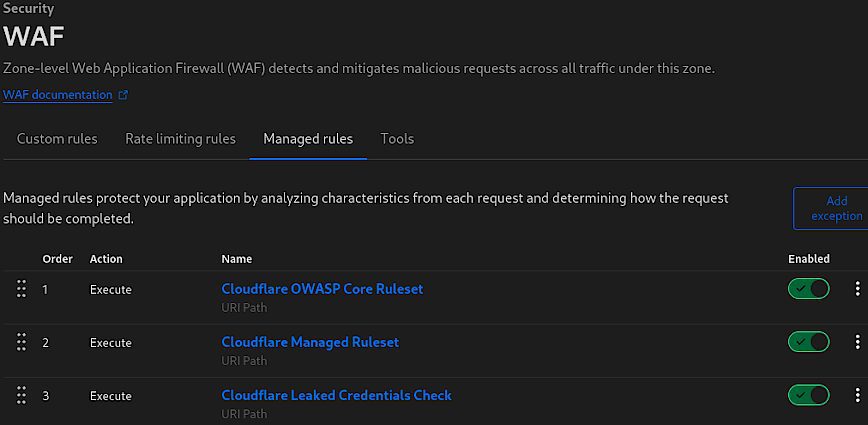
Which ruleset fires, and where do I look? Two places matter. The Cloudflare Managed Ruleset has a PHP group aimed at this class of traffic, and the OWASP Core Ruleset sits alongside it catching generic injection patterns. When something gets blocked, the rule ID shows up in Security Events. That log is the only place worth checking if you want to know whether a block was the PHP group, OWASP, or a custom rule you forgot you wrote. I have spent an embarrassing amount of time on a “WAF problem” that turned out to be my own rate limit rule.
Do I need Pro or Business? No. Managed rules are available across plans. Paid tiers buy you a larger ruleset, longer retention on the event log, and Logpush, which matters when you are reconstructing an incident two weeks later and the free-tier window has already rolled over. For blocking, the free tier does the job.
What if the attacker is already authenticated? This is where I would not lean on the WAF. A valid session posting a normal-looking form is exactly the traffic a signature engine is worst at judging. The rule may still catch a suspicious substring in the body, but do not build your defense around it.
What it means in practice on your boxes
A WAF rule sits in front of the request. The PH P process on your server is what actually runs the code, and that is where the blast radius gets decided. On my own WHM boxes the first thing I check after any PHP exploit scare is the disable_functions line, because a web shell that cannot call system(), shell_exec(), passthru(), proc_open(), or popen() is a much less useful web shell. cPanel ships a reasonable default in /etc/php.ini, but a surprising number of servers I have inherited have that line commented out or emptied by someone chasing a plugin that “needed” exec.
The rest of the short list:
open_basedirscoped to the account’s home directory, set per vhost through MultiPHP INI Editor or aphp_admin_valuein the pool configallow_url_include = Off, which has no business being on anywhereupload_tmp_dirpointed inside the account, not shared/tmp, so one compromised account cannot read another’s in-flight uploads- PHP-FPM pools running as the account user, not
nobody. If you are still on a DSO handler with everything owned by the same UID, the WAF is the only boundary you have
None of this blocks the exploit. It changes what happens after the exploit lands, and after is where the difference between “a defaced page” and “three hundred sites reindexed by a spam bot” gets made.
There is a version I would not skip either, and this is the part people leave out. Patching is the fix. If php2shell traffic reaches a box running an outdated PHP minor version with a vulnerable extension, the WAF has already failed by the time the log line appears. I have watched a customer sit on PHP 7.4 for two years because a theme broke on 8.1, and no edge rule was going to save that account. Cloudflare’s managed rules buy you the hours between disclosure and patch, and that window is worth having, but it closes.
My expectation, and I want to be clear this is a guess rather than something I have seen documented, is that we will see more exploit traffic routed through legitimate authenticated sessions in the next year, because signature evasion is cheaper than finding new bugs. If that happens, per-account PHP-FPM isolation and file integrity monitoring on upload directories start mattering more than another WAF rule.