Introduction
When you run a production WordPress site, letting automated tools inside is always a bit nerve-wracking. Setting up proper WordPress AI agent access control changes how you think about those external utilities. Instead of trying to lock the doors against everything, you are deciding which automated helpers get a key, which rooms they can enter, and what tools they are allowed to pick up once they are inside.
Most discussions about AI security focus on developers building models or system administrators blocking scrapers in robots.txt. If you manage a live site that your customers and editors rely on every day, that advice misses the mark. You are not writing Python scripts to parse LLM outputs. You are evaluating whether a third party support assistant or an automated SEO copywriter should have write access to your database.
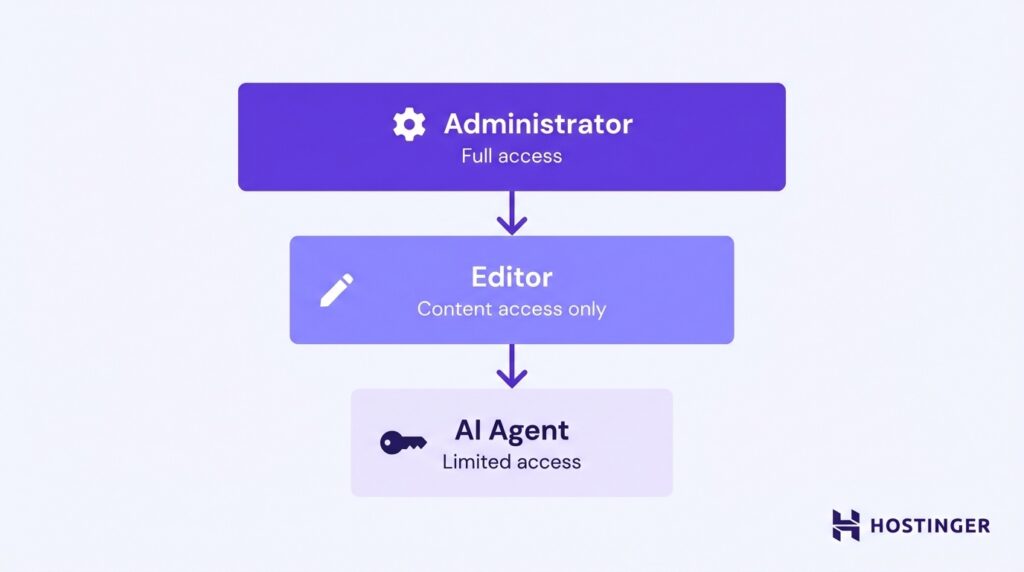
The strategy that keeps your site intact is the principle of least privilege. In plain terms, it means giving an automated tool the absolute minimum set of permissions required to do its specific job, and nothing more. If an AI agent only needs to answer customer support tickets based on your product catalog, it needs read access to published pages. It does not need permission to create user accounts, modify site settings, or delete old drafts.
I have spent years managing infrastructure on AWS and GCP, and I run my own small VPS hosting business. When a customer misconfigures permissions, things break in production. An AI agent with too much autonomy can cause database corruption or unintended mass edits just as easily as a runaway plugin. Granting access is easy. Containing the damage when an automated loop goes sideways is much harder.
By treating agent management as a permissions framework rather than a perimeter defense, you stop worrying about whether the bot is friendly. You start focusing on what the bot is actually capable of executing. You can review the foundational concepts behind this shift in perspective over at WP Engine’s guide on AI agent access control (opens in new tab), which outlines how these operational boundaries protect production environments.
Background
For most of the last decade, protecting a WordPress site from automated traffic meant one thing: blocking bad bots. If you saw a spike in 404 errors or CPU load, you checked robots.txt. If you saw suspicious user agent strings, you threw them into a WAF or a firewall rule. The mental model was simple. The internet was full of scrapers, spammers, and vulnerability scanners. Your job was to keep the perimeter closed and let the legitimate search engine crawlers in. That model worked when automation was passive. It worked when bots just read pages.
The landscape has shifted, not because the bad bots stopped attacking, but because a new category of agent emerged. These are active tools. They are designed to interact with the interface, not just consume the output. They query your site to answer questions, they draft content to save editor time, and in some cases, they execute actions on your behalf. The distinction is critical. Perimeter security stops traffic that isn’t authorized to be there at all. Internal permission security controls what traffic that is authorized to be there can actually do. You cannot solve the second problem with the first tool. If you rely only on blocking rules, you either block the helpful agent entirely, or you let it in with no guardrails on what it touches.
This gap is exactly what the OWASP Top 10 for LLM Applications calls out in its 2025 edition. They identify “excessive agency” as risk LLM06. The framework breaks this risk down into three specific root causes: excessive functionality, excessive permissions, and excessive autonomy. Think of it this way. Excessive functionality happens when an agent can do more than its specific job requires. Excessive permissions occur when the credential the agent uses has broader database access than the task needs. Excessive autonomy is the worst of the three. It happens when the agent is allowed to run without human review, effectively giving it free rein to act on its own logic.
When you combine all three, you have an agent that can do anything it wants, has the credentials to do it, and no one is watching to stop it. That is not a security incident waiting to happen. It is a security incident in progress.
Most current guidance on this topic is written for the developers building the agents. It tells them how to structure the prompt or how to handle the API response. But it rarely tells the site owner how to structure the WordPress side. If you are the person holding the admin account for a live site with customers and editors, you need a different lens. You are not building the agent. You are hosting the environment it runs in. Your responsibility is to define the boundaries of that environment before the agent ever makes its first request.
I have seen the confusion on my own hosting accounts. Clients install a “smart SEO assistant” plugin and give it the Editor role because the documentation said “it needs write access.” Two weeks later, the agent decided to “optimize” a critical landing page by rewriting it entirely and changing the permalinks. The traffic dropped because the URLs broke. The plugin was technically working. The permissions were the problem. The agent did exactly what it was allowed to do, and the permission model was the one that failed.
This is why we move away from blocking and toward structuring. We need to define who the agent is, what it can see, and what it can change. The next section looks at the practical model for doing that.
What’s happening now
The web is shifting from a passive display of information to an active interface where software agents act on behalf of users. This transition to what is often called the agentic web changes the fundamental assumption of how content is consumed. In the past, a browser requested a page, and the user read it. Today, an AI agent might query your product catalog, draft a comparison article using your data, and then modify your site’s structured data to ensure its answer gets cited. It is not just reading; it is transacting.
This shift creates a significant gap in current operational guidance. Much of the literature focuses on the developer side, detailing how to construct the agent’s logic or handle its tool calls. There is far less documentation aimed at the host side, specifically the team operating a live WordPress site where customers and editors rely on stability. For site owners, the challenge is no longer just keeping bad bots out. It is about managing the ones you want to let in. A support assistant or an internal knowledge retrieval tool needs legitimate access to be useful. If you block it, your workflow breaks. If you give it unrestricted admin access, you introduce the exact risks described in the OWASP LLM06 excessive agency category.
Traditional hosting security models were built for human users or simple scrapers. They assume that once an entity is authenticated, it will behave rationally and within its scope. AI agents do not always behave that way. They can suffer from hallucinations in their planning process, leading to unexpected actions. They can get stuck in loops, repeatedly attempting a failed task. They can interpret instructions in ways that have unintended consequences for your live database. Because these agents require scoped access to site data to function, you cannot simply firewall them off entirely. You need a permissioning layer that is granular enough to allow useful work but restrictive enough to prevent damage.
Consider a specific scenario involving a small e-commerce store. The owner implements an AI agent to handle basic customer inquiries about order status. The agent needs to read order data. If the security model is too broad, the agent might gain access to customer emails or payment information, which is not necessary for its job but is a severe liability. If the model is too tight, the agent cannot answer the questions, and the implementation fails. The balance is operational. It requires defining the exact data fields the agent can query, the rate limits on its requests, and the logging requirements for every interaction.
I expect that in the coming year, hosting platforms will begin offering native, managed integrations for these agent credentials. We will likely see standardized API layers that handle authentication and audit logging at the platform level, reducing the burden on individual WordPress plugins. This would centralize control and make revoking access a single switch rather than a plugin deactivation. For now, however, the responsibility falls on you. You must structure the environment to accommodate these new actors without compromising the integrity of the site you maintain. The tools are evolving, but the core principle of containment remains the same: define the job, grant the minimum access for that job, and log everything.
What it means in practice
To make AI agent access control work on a live site, you have to break down capabilities into manageable boundaries. I manage servers and small hosting accounts where a single misconfigured cron job or rogue script can fill a disk or lock a database table, so I am naturally suspicious of automated tools that ask for broad administrative rights. The same caution applies to artificial intelligence agents. You should never give an automated tool the keys to the kingdom just because it promises to save you time.
Instead, permissions should be divided into three distinct operational tiers: Read, Draft, and Execute. These tiers create a structural firewall between automated convenience and site destruction.
The Read tier is the safest and most common entry point. An agent operating at this level can retrieve content it is explicitly allowed to see, such as published posts, public product pages, or static documentation. On my own boxes, I treat these read requests similarly to how I treat external uptime monitors. They need an authenticated endpoint, but they do not need to touch the database directly or read unpublished drafts. You must limit Read access strictly to published content, apply strict rate limits to prevent denial of service through query abuse, and assign a unique credential to that specific agent so you can revoke it independently if it starts misbehaving.
The Draft tier introduces write actions, but with a mandatory safety catch. An agent in this category can create or edit content, but nothing goes live without human intervention. Think of it as an eager junior copywriter who leaves sticky notes on your desk rather than publishing straight to the homepage. For this tier, you should run tests exclusively in a staging environment. Every suggested change must sit behind a human approval gate, and version history must remain turned on so you can roll back a bad edit instantly.
The Execute tier involves actions that directly alter the live production environment, such as publishing pages, deleting data, changing site settings, or installing plugins. You should avoid granting this level of access by default. If a specific business workflow genuinely requires an agent to publish content directly, you must narrow its scope to a single custom post type, require an approval gate anyway, create a fresh backup first, and maintain a full audit log of every command it executes.
As detailed in this guide on AI agent access control (opens in new tab), these tiers are not a ladder that every integration needs to climb. Support bots and search tools rarely need to write anything. They just need to read. Keeping your permissions tightly scoped ensures that a runaway script or a compromised API token remains a minor logging event rather than a total site outage.
What to expect next
How should you structure your initial rollout to verify WordPress AI agent access control? Start with a read-only pilot focused strictly on public content. This means you configure the agent to fetch published posts, pages, and product listings only. It cannot see drafts, private content, user profiles, or site settings. The goal of this first phase is not to test functionality, but to establish a baseline of safe, logged interactions. You want to see exactly which endpoints the agent hits, how often it polls, and whether its requests follow a predictable pattern.
During this pilot, weekly auditing of request logs becomes mandatory. You must review these logs before you consider expanding permissions to the Draft tier. If you see unexpected user agents, irregular request spikes, or attempts to access restricted paths, you stop immediately. This audit period is where you verify that your rate limits are holding and that your unique credentials are scoped correctly. Without this logging phase, you are flying blind. You might grant write access to an agent that is already probing your security perimeter, and you will not know until an incident occurs.
Moving to the Execute tier is rare and should only happen after a staging environment has proven the agent’s reliability and safety. In most operational contexts, I do not recommend granting Execute access at all. The risk profile is too high. If you have a specific business case for it, such as an automated inventory update system, you prove it works in staging for at least two full monthly cycles. You verify that the agent can execute tasks without deleting data or corrupting metadata. You confirm that your backup and restore points are functional. Only then do you move it to production, and even then, you keep the scope incredibly narrow.
I expect that within the next two years, hosting platforms will offer built-in, sandboxed agent environments where these permission tiers are managed natively rather than through custom code. For now, you are responsible for the operational safety of your live site. The trend is moving toward agents that act with high autonomy, but the security model must remain manual and conservative for the host. Until the industry standardizes a way to verify agent intent, your role is to enforce the boundaries. You decide what the agent can touch. You log what it does. And you hold the power to revoke access instantly if the behavior drifts. This phased approach, starting read-only and only expanding after proven stability, is the only way to protect your customer data and editorial integrity while still taking advantage of new tooling.
Closing: One concrete next step
Stop thinking about what the AI agent should do eventually. Start with the account you will create for it today. This is not a theoretical exercise; it is the single point of failure that determines whether a runaway script stays contained or ripples out to break your production database.
Create a dedicated WordPress user account for the agent. Do not use your admin account. Do not use a generic “service” account shared between multiple tools. Give this user a name that reflects its specific function, like agent-support-bot-v1. If you run a support assistant, name it that. This naming convention matters because when you review user activity logs six months from now, you need to know exactly which automated entity made that change without guessing.
Assign this new user the Subscriber role by default. In WordPress, the Subscriber role has no write capabilities. It cannot edit posts, upload media, or change settings. It can only read what is explicitly exposed to non-privileged users. This is your baseline for the Read tier. If you are following the guidance from the WP Engine blog (opens in new tab), this aligns with their recommendation to start with strict, read-only access to published content.
Now, configure the agent’s access token or API key to use these specific credentials. Do not use application passwords that inherit your personal admin capabilities. If you are on a managed host or using a plugin for external integrations, ensure the integration settings map this specific user to the API calls.
Run a simple test. Have the agent fetch a published blog post. Then, have it attempt to create a draft. The request should fail with a permission error. This failure is the feature, not a bug. You want to see the rejection logged. This confirms that your boundaries are active and that the agent cannot escalate privileges on its own.
This immediate containment step takes ten minutes. It does not require you to rewrite your entire site architecture. It simply ensures that if the agent does something unexpected, the blast radius is limited to reading public data, not deleting your client database. You have built a cage before the animal walked in. That is the practical definition of securing WordPress AI agent access control. The rest of the strategy, expanding to Draft or Execute tiers, is a future discussion. Today, you just need that locked door.