Intro
When you browse Hugging Face looking for a model to run locally, you will quickly notice every checkpoint comes with a format label: GGUF, GPTQ, AWQ, EXL2. Those four terms sit at the center of the GGUF vs GPTQ vs AWQ vs EXL2 debate, and they cause more confusion than they should. Most of that confusion comes from mixing two separate layers. A file container defines how tensors sit on disk. A quantization method defines how those same tensors get squeezed into fewer bits. You can put a GPTQ-quantized model inside a safetensors file, just like you can put an AWQ model inside a GGUF wrapper. They are not the same thing.
The simplest rule you can carry is the weight memory formula: parameters multiplied by bits per weight, divided by eight. An eight billion parameter model at sixteen bit runs about sixteen gigabytes. Shrink that down to four point five bits per weight, and you land near four point five gigabytes. A seventy billion model at sixteen bit hits roughly one hundred and forty gigabytes, and drops to around thirty-nine gigabytes once you quantify it. This is arithmetic, not a vendor benchmark. It covers the raw weights only. The KV cache, runtime overhead, and batch processing all add more on top before you hit your actual VRAM limit.
What most people actually need is a practical decision. You want to pick a format that fits your GPU memory and works with the inference library you already have installed, without buying a new card. If you run llama.cpp or Ollama, GGUF is the natural choice because the ecosystem treats it as first class. If you use vLLM on an A100 or H100, GPTQ or AWQ inside a safetensors container usually gives you better throughput. EXL2 and EXL3 sit somewhere in between, tying their quantization method to a storage layout optimized for one specific library.
The goal of this guide is to stop treating format names as interchangeable labels. You will see which container matches which hardware, where quantization actually costs quality, and what small adjustments you can make without retraining. Pick one model you already want to run, check your available VRAM against the weight size, and choose the format that lets it load cleanly. Everything else follows from that single decision.
Background: GGUF vs GPTQ vs AWQ vs EXL2 Fundamentals
Before you pick between GGUF, GPTQ, AWQ, or EXL2, you need to separate two things that get conflated constantly: file containers and quantization methods. This is the single biggest source of confusion for anyone choosing between local LLM inference formats.
A container defines how tensors sit on disk. The three you will encounter are safetensors, PyTorch pickle files (.bin / .pt), and GGUF. A quantization method defines how those weights get squeezed into fewer bits. GPTQ, AWQ, bitsandbytes NF4, and llama.cpp’s K-quants and I-quants are all methods. They live inside containers.
Unquantized models ship as sixteen-bit weights in either pytorch_model.bin or model.safetensors. The older .bin and .pt files use Python pickle. That means loading an untrusted checkpoint can execute arbitrary code on your machine. Hugging Face created safetensors to remove that risk entirely. A safetensors file is a small JSON header followed by raw tensor buffers, nothing executable inside. Tensors can be memory-mapped and loaded one at a time without reading the whole file. Safetensors is now a PyTorch Foundation project. The important nuance is that most GPTQ, AWQ, EXL2, and EXL3 models are also stored inside .safetensors files. The quantization method lives in the tensor contents and a config file, not in a new container type.
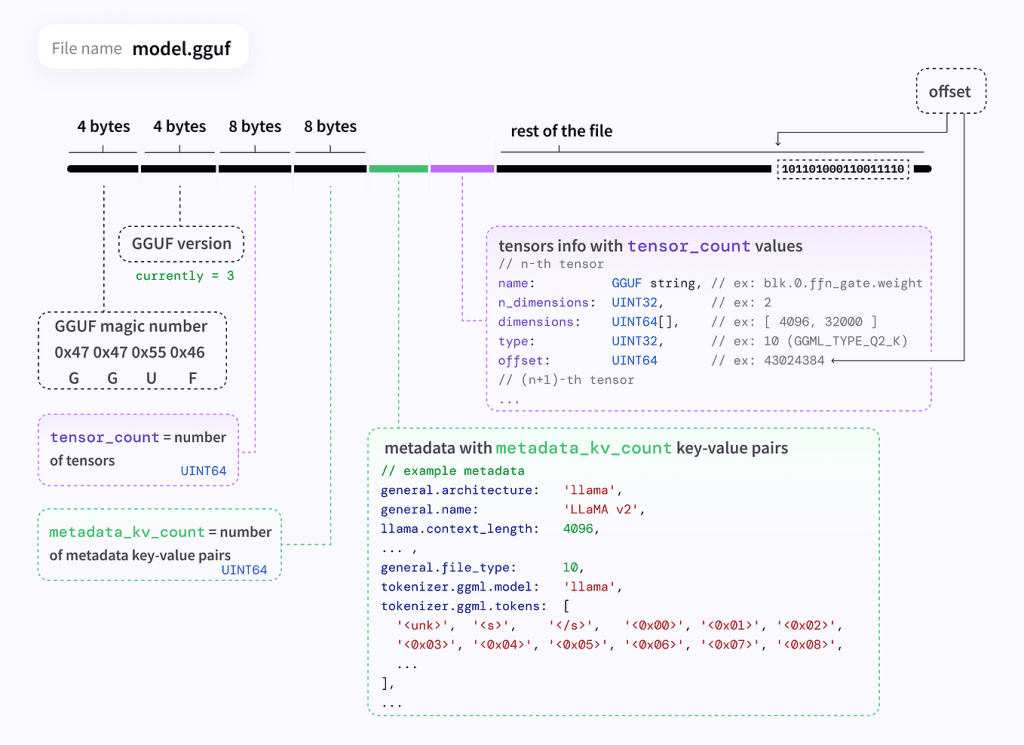
GGUF is different because it is both a container and an ecosystem. It was created by Georgi Gerganov on August 21, 2023 as the replacement for the older GGML format. GGUF replaced GGML because the old containers could not declare which architecture a model belonged to, so adding a single new hyperparameter would break every existing file. GGUF switched to typed key-value metadata, letting new fields be added without breaking old files. The spec lists five design goals: single-file deployment, extensibility, mmap compatibility, easy loading, and complete information inside the file. Unlike tensor-only containers, GGUF carries the tokenizer, special tokens, and a Jinja chat template alongside the weights. Think of it like a ZIP archive that contains not just the document but the reader software and the font files too.
GPTQ, AWQ, and the newer EXL2 and EXL3 are quantization methods that can live inside safetensors. EXL2 and EXL3 tie their method to a specific storage layout optimized for one inference library. That makes them fast but less portable than GGUF or safetensors-based GPTQ and AWQ.
The reality is that GGUF vs EXL2 often comes down to whether you want portability or raw throughput. If you run llama.cpp, Ollama, LM Studio, or GPT4All, GGUF is native. If you are targeting vLLM on server-grade hardware, GPTQ and AWQ inside safetensors will serve you better. The ecosystem tooling keeps evolving, and I expect calibratable methods like imatrix-based GGUF to close the gap for mid-range GPUs over the next year.
What’s Happening Now
GGUF naming convention is one of those things that looks like alphabet soup until you sit down and check the arithmetic. The suffix on a file like Q4_K_M.gguf tells you exactly what quantization scheme was applied, and the math behind it is straightforward enough to verify yourself. A Q4_K super-block holds 256 weights. That is 256 times 4 bits, which equals 1,024 bits. Then you add 8 blocks worth of scales and minimums at 12 bits each, giving you another 96 bits. On top of that sits a 16-bit super-scale and a 16-bit super-minimum. The total comes to 1,152 bits divided by 256 weights, which works out to exactly 4.5 bits per weight. Not 4.0. Not quite 5.0. The _M, _S, and _L labels are not new types. They are mix variants. Q4_K_M for instance uses Q6_K for half of the attention and feed-forward tensors and Q4_K for the rest, which is why the effective file size averages above 4.5 bits per weight rather than landing on it exactly.
The same scrutiny applies to the newer I-quants. IQ4_XS compresses 256-weight super-blocks using an importance matrix and achieves 4.25 bits per weight. IQ3_XXS drops to 3.06, and IQ2_XXS goes even lower at 2.06. llama-quantize will actively warn you when you run those lower-bit mixes without providing calibration data through the imatrix system. It is not being cautious for no reason.
A reference perplexity table from Hugging Face for a Llama-2-7B-class model shows the practical trade-offs clearly enough. FP16 sits at a perplexity of 5.9565 with a 13.0 GB file. Q8_0 shifts only 0.03 percent away from that baseline at 7.0 GB. Q6_K moves to 0.13 percent at 5.5 GB. Q5_K_M reaches 0.39 percent at 4.8 GB. Q4_K_M lands at 1.68 percent higher perplexity but the file is only 4.1 GB. I would treat those numbers as illustrative rather than gospel. That table comes from a 2023-era model, and newer architectures do not always degrade in the same way when pushed into lower bit widths. Some hold quality remarkably well at Q4_K_M. Others fall apart noticeably.
The importance matrix deserves its own mention because it is the single most practical tool available for squeezing better quality out of aggressive quantization. llama-imatrix computes an importance map from a text corpus you supply, and passing that into llama-quantize with the –imatrix flag can shift quality noticeably, especially on tasks that demand precise weight retention like mathematical reasoning or code generation. When the quantizer warns you about missing calibration data, it is telling you to run imatrix first rather than guess at random.
Hugging Face has also added newer type entries like TQ1_0 and TQ2_0 for ternary weights, plus MXFP4, a 4-bit microscaling floating-point type. These exist in the tables today, but I do not know how they perform on older consumer hardware that lacks the tensor-core support those layouts were designed around.
What It Means in Practice: GGUF vs GPTQ vs AWQ vs EXL2 Hardware Fit
Choosing between these formats usually comes down to one question: what hardware are you actually running on, and what inference library will talk to it? The answer changes everything.
An 8 GB consumer GPU like an RTX 4070 can run a 7B model at Q4_K_M in GGUF without breaking a sweat. That same card struggles to load the FP16 version of a 13B model, and GPTQ or AWQ quantized versions of that same model would need vLLM or a similar backend to run efficiently. You cannot pick a format in isolation. The inference library dictates what is actually possible. llama.cpp reads GGUF natively. vLLM prefers GPTQ and AWQ for GPU inference. EXL2 is locked to its own custom executor. Mixing them up wastes time and VRAM.
The quality trade-off between Q4_K_M and Q8_0 on GGUF is often smaller than people expect on casual tasks, but it becomes obvious when you push the model toward math or code generation. I have seen Q4_K_M handle basic chat and summarization just fine on a 4 GB laptop GPU, while Q8_0 runs noticeably sharper on technical writing. The difference is not dramatic for every workload, but it is real.
Downloaded checkpoints deserve basic security hygiene. A .bin or .pt file can execute arbitrary code during loading because of Python pickle. If you are pulling a model from an untrusted source, treat that as a real risk and reach for safetensors instead. This is not theoretical. The Hugging Face ecosystem moved toward safetensors precisely because accidental code execution in model files was happening in the wild.
You cannot convert between quantization formats after the fact. GPTQ, AWQ, EXL2, and GGUF K-quants are all baked into the weights at export time. Switching from GPTQ to GGUF means running the quantization again, which costs time and requires the original high-bit model as source material. Plan your format choice before you start downloading.
A practical next step is simple. Pick the one model you actually want to run locally, grab the GGUF Q4_K_M version, and launch it with --mlock enabled in llama.cpp. Watch the actual VRAM usage and pay attention to quality on tasks you care about. If the output feels soft on structured reasoning, run llama-imatrix over a text corpus from your domain and re-quantize. That is the workflow that matters, not benchmark charts.
What to Expect Next
The quantization frontier is moving faster than most people realize. Ternary weight formats like TQ1_0 are already sitting in Hugging Face tables alongside the K-quants most people actually use. That is a full order of magnitude below Q4_K_M in bits per weight, which makes me skeptical about when they will matter outside research notebooks. There is also MXFP4 appearing in those same tables, a microscaling floating-point type that distributes precision differently than the blockwise approach GGUF has used since 2023. The general direction is obvious, but the practical landing zone is still unclear.
Calibration data will matter more as we push lower. I have watched llama-imatrix warnings pop up for 1-bit and 2-bit GGUF types, and the quantizer will refuse to proceed nicely without a supplied importance matrix. As bits drop, the difference between a calibrated quant and an uncalibrated one gets wider rather than narrower. For format selection guides published today, that is a detail most readers will ignore until they hit it on their own hardware.
I expect ecosystem tooling to keep chasing lower-bit practical quality, but I do not know how these newer layouts scale on older GPUs that lack specialized tensor-core support. A format that runs fine on an RTX 4090 with dedicated FP8 or microscaling pathways might just fall back to slow emulation on a 2080 Ti or a datacenter A100 from 2020. That gap matters for anyone running inference on mixed hardware, which is most small hosting operators and people running local LLMs alongside real services.
The GGUF vs GPTQ vs AWQ vs EXL2 question will probably keep looking different six months from now. New quantization paths appear regularly, and the storage layout decisions made today shape what runs smoothly tomorrow. If you are building a workflow around one format, assume you will need to re-evaluate as the tooling shifts. The MarkTechPost breakdown from September 2026 is useful reference material for where things stand now, but the field does not sit still MarkTechPost: GGUF vs GPTQ vs AWQ vs EXL2 Explained (2026) (opens in new tab).
My practical reading is that GGUF remains the safest default for most self-hosted setups because the format carries everything you need in one file and the quantization variety covers the range from near-lossless to aggressively compressed. GPTQ and AWQ stay relevant when your inference library locks you into CUDA-native paths with mature kernel support. EXL2 occupies a middle ground that makes sense if you are already deep in the lm-format ecosystem. Ternary and microscaling formats will chip away at the low-bit corner, but they are not ready to replace the K-quant workhorses for most production local inference yet.
Close: A Concrete Next Step
Stop reading format tables and pick a model you actually want to run. Download or convert it to GGUF Q4_K_M and serve it through llama.cpp or a compatible frontend like Ollama or LM Studio. Do not assume the file size tells you how much VRAM the process will grab. A 4.1 GB Q4_K_M file for a 7B model does not load into 4.1 GB of GPU memory. The KV cache, context buffers, and runtime allocations push real usage significantly higher, especially when you run longer prompts or larger batch sizes. Launch the server with the --mlock flag if your platform supports it. That forces the OS to keep the mapped pages resident instead of swapping them out under memory pressure. Watch the actual VRAM numbers with nvidia-smi while the model is serving, not before it starts.
If the output looks soft on tasks that matter to you, particularly math reasoning or code generation, do not blame the format immediately. Q4_K_M is a reasonable starting point, but a generic quantization run applies uniform importance assumptions across all weights. Requantize with an importance matrix built from a text corpus that resembles what you will actually feed the model. Run llama-imatrix on a few thousand tokens of representative input, then pass that file into llama-quantize --imatrix. The quantizer uses those calibration signals to preserve weights that carry more structural importance. This step matters most at lower bit depths, and the quantizer itself will warn you when it thinks you should supply one.
Keep two reference pages open while you experiment. The Hugging Face GGUF documentation hosts the complete type table with descriptions for every K-quant, I-quant, ternary, and microscaling option currently available. The Unsloth documentation explains how the _S, _M, and _L mix labels behave in practice, which saves you from guessing why a Q4_K_M file behaves differently from a straight Q4_K dump.
Run the model. Measure what happens. Adjust the quantization strategy only after you know whether quality or capacity is the actual bottleneck.